

Welcome
The v2 API is SELECT’s unified, RESTful API. All v2 endpoints are accessed under the base URLhttps://api.select.dev/v2.
v2 is the current SELECT API. The v1 API is
deprecated and will be removed on December 14, 2026.
Authentication
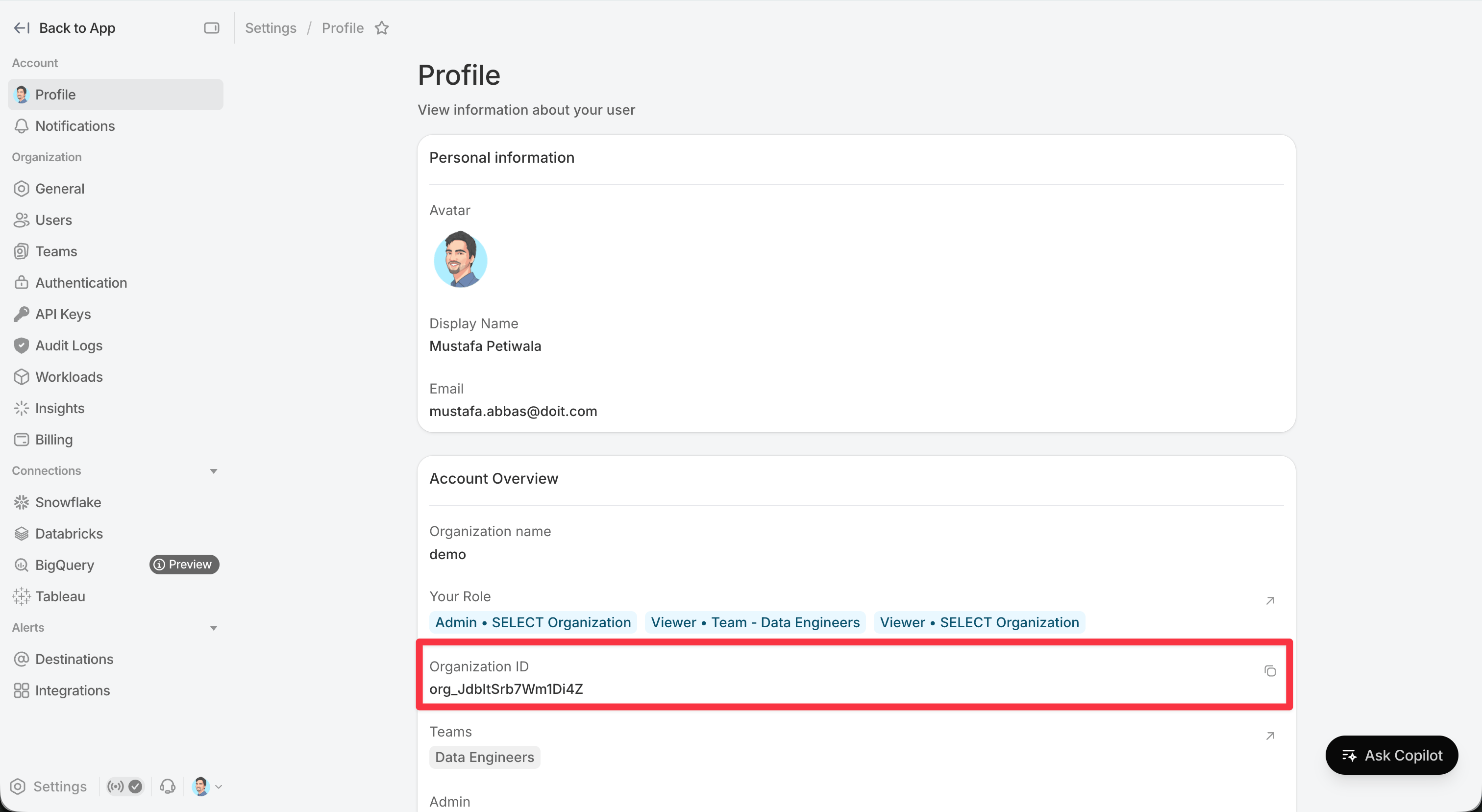
Every request needs two headers:Organization ID
Thex-tenant-id header is your SELECT organization ID (org_...). It can be found in the SELECT app by navigating to settings by clicking the gear in the bottom right of the page and viewing your profile information.
What changed from v1
- Organization is a header, not a path parameter. v1 routes embedded
organization_idin the path (/api/{organization_id}/...). v2 identifies your organization with thex-tenant-idheader, so paths are clean resource names (/v2/audit-logs). - Cursor pagination. List endpoints return a
page_token; there is no offset/page paging. - RFC 9457 problem responses. Errors use
application/problem+jsonwith a stablecodefield.
Pagination
List endpoints return at mostmax_results records (default 50, max 500) plus a page_token:
page_token back. Keep going until page_token is null — that means you have reached the end.
Responses
Standard HTTP status codes indicate success or failure. Errors returnapplication/problem+json:
code field for programmatic handling; it is stable across releases.